

Qatar Visa Check: How to Check Your Visa Status on MOI
Last checked: 23 Nov 2026 · Main sources: MOI Visa Services, the MOI visa inquiry page, Hukoomi and the Qatar Visa Center tracking page.
For a Qatar visa check, open the Ministry of Interior (MOI) Visa Inquiry page at fees2.moi.gov.qa and choose Search By: application number (with the sponsor’s ID or the application date), visa number (with nationality) or passport number (with nationality). Type the code and press Search. It is free and needs no login.
An approved visa can be paid for and printed on the same page. For a refused application, MOI shows its remarks. Workers who apply through a Qatar Visa Center track those steps on the QVC site, and Hayya e-visas are tracked on Hayya.
QID & Residency Guide is an independent website, not MOI. We cannot see or check any visa, and we never ask for your passport, visa or application number. Enter those only on the official MOI, Qatar Visa Center or Hayya websites.

Before You Start Your Qatar Visa Check
Have one of these sets of details ready. You only need one set:
| You have | What MOI asks for | Best for |
|---|---|---|
| The application number (from your sponsor) | Application number, plus the sponsor or representative ID or the application date | Following a work or visit visa application before it is approved |
| The visa number (printed on the visa) | Visa number and nationality | Checking or reprinting a visa that has been issued |
| Only your passport | Passport number and nationality | When you have no visa or application number |
- If no record appears, try the passport number that was used for the application.
- The application number and the visa number are different. The sponsor or company receives the application number when they apply, so ask them for it. The visa number comes with the issued visa.
- The applicant, the sponsor or a company representative can all run the check if they have the details.
How to Do a Qatar Visa Check on the MOI Website
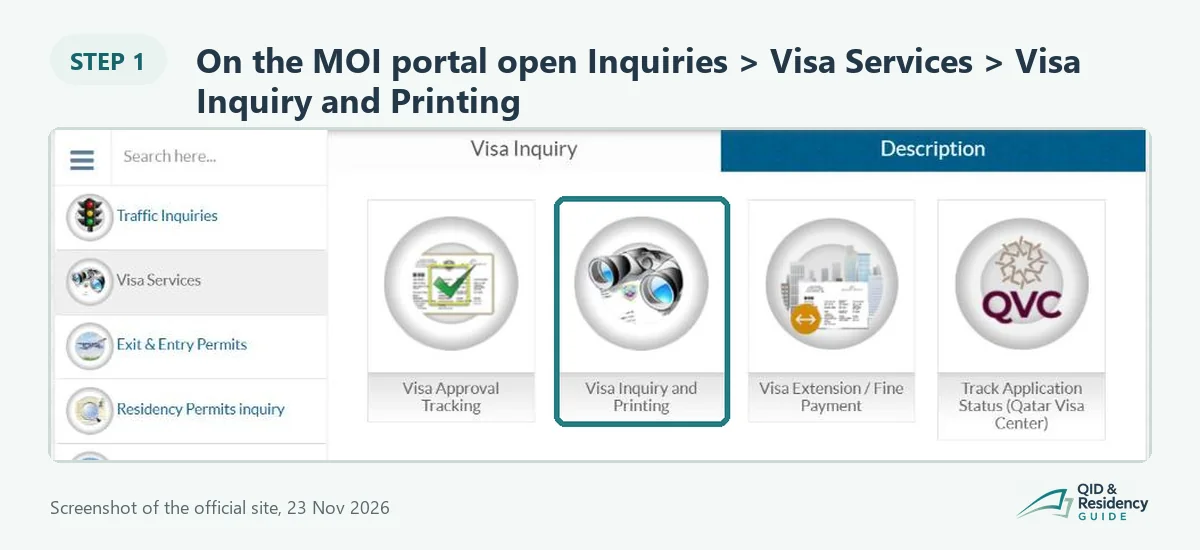
- Open the MOI Visa Inquiry page, or go to portal.moi.gov.qa > Inquiries > Visa Services > Visa Inquiry and Printing.
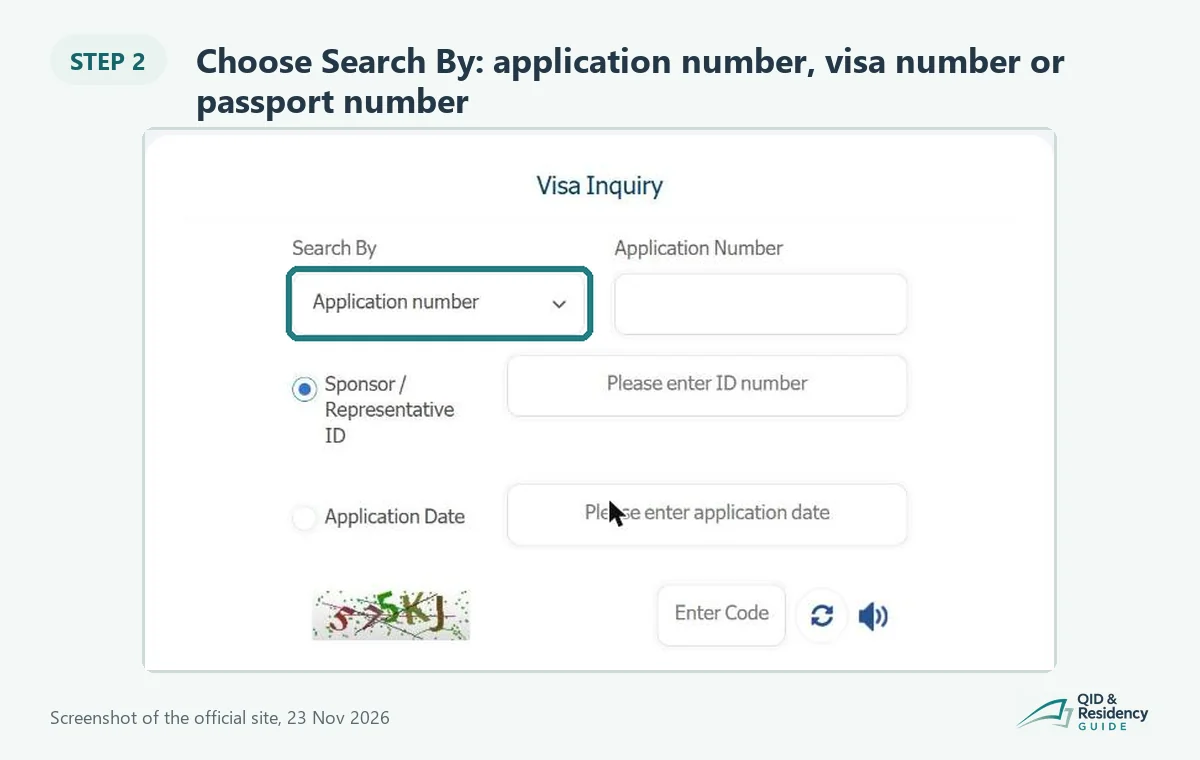
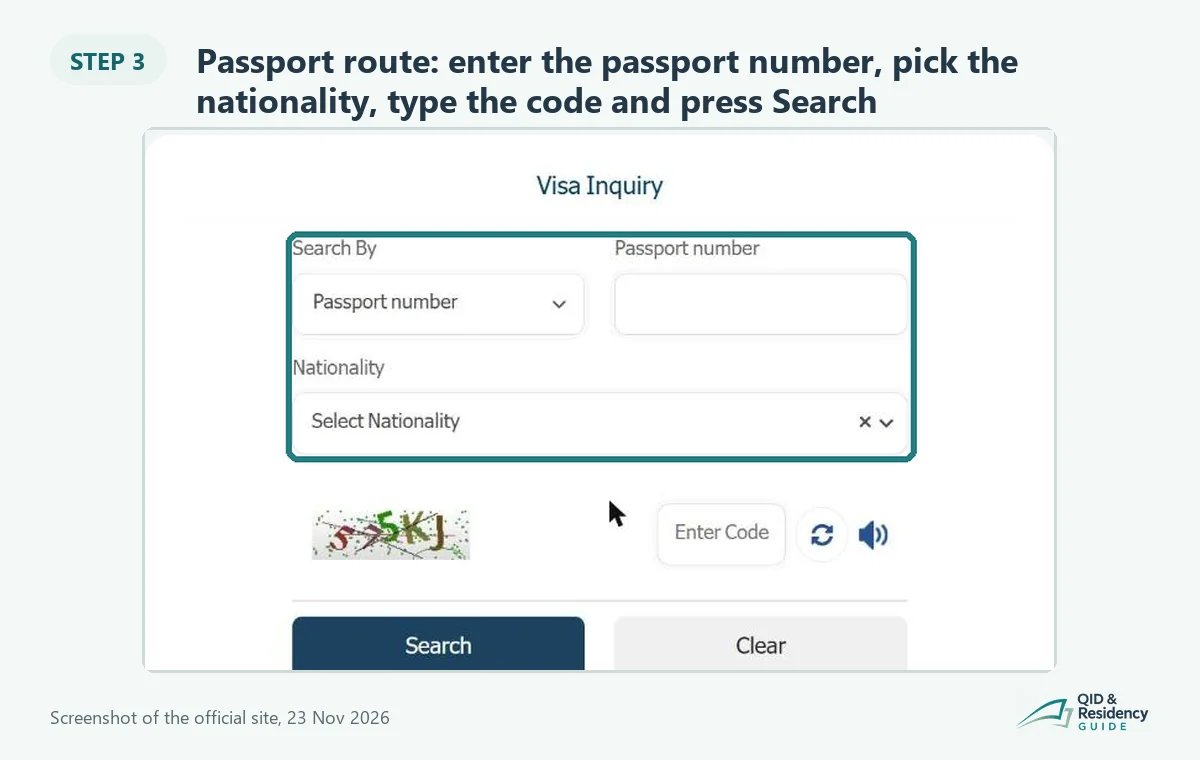
- Under Search By choose Application number, Visa number or Passport number.
- Fill in the fields that appear for that choice.
- Type the code shown in the picture (use the audio button if it is hard to read).
- Press Search. The result shows the visa or application and its status.
- If the visa is approved, pay the fee shown and print the visa.
Qatar Visa Check by Application Number
Choose Application number, enter it, then pick one of the two options under it: the Sponsor / Representative ID, or the Application Date. This is the route for following an application before the visa is issued (MOI calls it visa approval tracking).
Qatar Visa Check by Visa Number
Choose Visa number, enter the number exactly as printed on the visa and select your nationality. Use this to confirm an issued visa or to reprint it.
Qatar Visa Check by Passport Number
No visa or application number? Choose Passport number, enter the passport number used in the application and select the nationality. Use this method if you have the passport number. If nothing shows at an early stage, try the application number instead.
Visiting on a Hayya e-visa? You can also look it up on Hayya’s Track your E-Visa page, by entry reference number or by passport number and nationality.
Which MOI Visa Service Do I Need?
Under Inquiries > Visa Services the MOI portal lists four services. Three of them open the same MOI payment gateway page; the fourth goes to the Qatar Visa Center (QVC).
| MOI service | What it is for |
|---|---|
| Visa Approval Tracking | Follow up the approval of a work or visit visa application by its application number |
| Visa Inquiry and Printing | Check a visa by visa number or passport number, and print or reprint an issued visa |
| Visa Extension / Fine Payment | Pay visa extension fees and visa fines |
| Track Application Status (Qatar Visa Center) | Track the QVC steps (biometrics, medical, contract) for workers who apply through a QVC abroad |
What Your Qatar Visa Status Means
MOI does not publish a list of the exact words its screen shows, so the labels below are plain-English descriptions, not official screen text. Hukoomi, the government portal, describes three outcomes (Hukoomi: Visa Inquiry and Printing):
| Result | What it means | What to do |
|---|---|---|
| Approved | The visa has been granted. | Pay the fee online and print the visa. Print fees vary by visa type. |
| Rejected | The application was refused. | Open the Remarks icon to see the reason, then ask your sponsor or MOI whether it can be corrected or a new application is possible. |
| Under processing | MOI has not decided yet. | You can only read MOI’s remarks. Check again later and stay in touch with your sponsor. |
If you applied for a Hayya e-visa, Hayya uses its own words: Pending, Pending Payment (pay within 14 days) and Pending Accommodation Confirmation (confirm within 30 days), according to the Hayya FAQ.
Qatar Visa Not Found or the Inquiry Is Not Working
- No result does not mean rejected. Usually a detail does not match or the application is at an early stage.
- No result: check the number again, and make sure the nationality is the one in the application. Try another route, for example passport number instead of visa number.
- Wrong stage: before approval there is no visa number yet, so search by application number or passport number.
- New passport: use the passport number the application was made with.
- Code not accepted: refresh the picture, type it again and press Search straight away.
- Page does not load: turn off ad blockers or translation add-ons, try another browser, or try again later.
- Still nothing: ask your sponsor, who can see the application in MOI e-services, or call MOI (numbers below).
How to Print Your Qatar Visa
Once the result shows an approved visa, the same MOI page lets you pay the visa fee and then print it. Hukoomi says the print fee depends on the visa type, so the amount appears on screen. Sponsors who log in to MOI e-services can also follow their applications and pay visa fees under “View My Visa Applications”, which needs a smart card login (Hukoomi).
After printing: check that your name and passport number match your passport, confirm the visa number and validity dates, and keep both a digital and a paper copy for travel.
Can I Check My Qatar Visa in Metrash?
Metrash can be used to pay a visa fee: MOI says that under Visa > Operations > Pay Visa Fee you choose the visa, pay, and receive a copy of the visa by email (MOI, July 2026). We found no published visa status inquiry in the app, so for a Qatar visa check use the MOI website above. For a visa issued through Hayya, use Hayya’s Track your E-Visa page. Once you are in Qatar with a Qatar ID, you can use Metrash for many residency services; see our Metrash guide.
How to Track a Qatar Visa Center (QVC) Application
Workers from some countries complete their visa steps at a Qatar Visa Center before travelling: fingerprints, iris scan, photo, a medical test and, where needed, signing the employment contract. Track it on the QVC Track Application page with your passport number, visa number and the captcha.
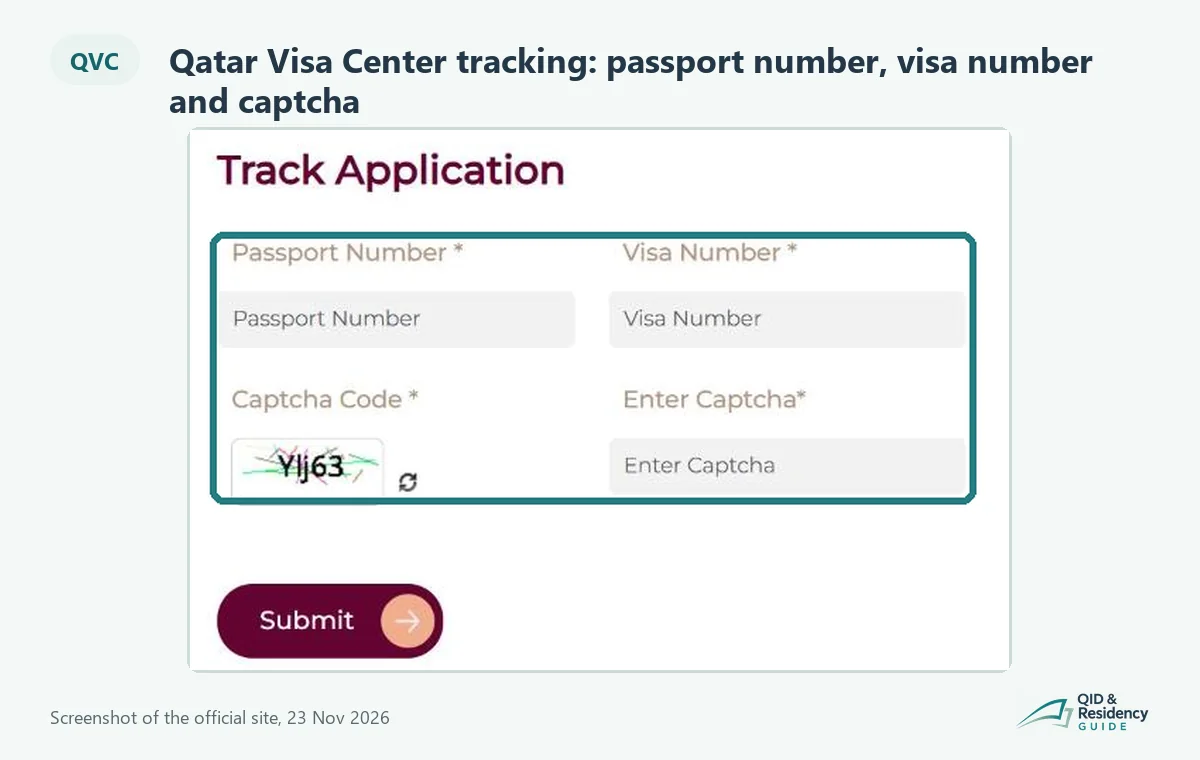
Status descriptions QVC lists:
- Appointment Confirmed, Appointment No show, Appointment Reschedule
- Biometric Completed, Re-Enrolment Required
- Medical Complete
- Result Available (results go to your employer)
QVC centres (per qatarvisacenter.com, 23 Nov 2026): Bangladesh (Dhaka, Sylhet), India (Chennai, Delhi, Hyderabad, Kochi, Kolkata, Lucknow, Mumbai), Nepal (Kathmandu), Pakistan (Islamabad, Karachi), the Philippines (Manila) and Sri Lanka (Colombo). QVC itself warns that finishing biometrics and the medical does not mean the visa is issued, and that it does not offer jobs. For booking, what to bring, fees and every status, see our full QVC Qatar guide. After you arrive, the next steps are in our fingerprint guide and how to get a Qatar ID.
Qatar Visa Check vs Qatar ID Check
A visa check tells you about an entry visa or an application. Once you are in Qatar and your residence permit is issued, you check your Qatar ID instead, on the MOI Official Documents page. If you have arrived but your card is not ready, see the Qatar ID check by visa number guide, and for everything else our Qatar ID check guide.
Types of Qatar Visas
| Visa | In short | Source |
|---|---|---|
| Visa-free entry | Citizens of more than 102 countries can enter without applying beforehand; Visit Qatar calls this visa-free entry (also known as visa on arrival). | Visit Qatar |
| GCC nationals | Do not need a visa to enter Qatar. | Visit Qatar |
| Hayya tourist visa (A1) | For tourism, applied for on Hayya; Visit Qatar lists QAR 100. | Hayya |
| Hayya A2 (GCC residents) | For residents of GCC countries; stay up to 30 days from entry. | Hayya |
| Hayya A3 (visa with ETA) | For holders of a valid US, UK, Canadian, Schengen, Australian or New Zealand visa or residence. | Hayya |
| Hayya A4 (companion of a GCC citizen) | Fee QAR 100. | Hayya |
| Business visa | Issued through the Ministry of Foreign Affairs: QAR 200, usually within 24 hours, valid 3 months, stay of one month, extendable up to 3 months. | Hukoomi |
| Transit | Qatar Airways passengers transiting at least 6 hours can apply at the Discover Qatar transit desk. | Visit Qatar |
| Qatar-Oman joint visa | Valid 30 days, multiple entry, extendable by 30 days for a fee. | Visit Qatar |
| Family visit visa | Applied for by the resident sponsor through the MOI family applications e-service. | Hukoomi |
| Work and family residence visas | Applied for by the employer or family sponsor; lead to a residence permit and Qatar ID. | Residence permits |
Hayya states that the e-visa fee is QAR 100 and is not refundable.
Visa Extension and Overstay
Visa extensions and visa fines are paid through the same MOI Visa Extension / Fine Payment page. For some visa-exempt visitors, Hukoomi describes an online extension: enter the visa and passport number, choose the nationality, type the code and press Extend; the fee varies (Hukoomi). Hayya e-visa extensions are handled by the Directorate of Passports at Hamad International Airport, per the Hayya FAQ. We could not find an official overstay fine amount for visit visas, so check it on the MOI page before you pay.
Official Contacts for Visa Questions
| Who | Contact |
|---|---|
| MOI General Directorate of Borders, Passports and Expatriates Affairs | 44890333 |
| MOI headquarters | 2366666 |
| Metrash and MOI e-services help | 2342000 |
| Hukoomi government contact centre | 109 in Qatar, or +974 4406 9999 |
| Hayya | 2022 in Qatar, or +974 4441 2022 |
Qatar Visa Check FAQs
Can I Check My Qatar Visa Using My Passport Number?
Yes. On the MOI Visa Inquiry page choose Search By > Passport number, enter the passport number used in the application, select your nationality, type the code and press Search.
How Can I Check My Qatar Visa Without a Visa Number?
Use the passport number route, or the application number with the sponsor ID or application date. Before approval there is no visa number yet.
How Do I Check Whether My Qatar Visa Is Approved?
Search on the MOI Visa Inquiry page. An approved visa can be paid for and printed there; a rejected one shows the reason under Remarks.
What Should I Do If My Qatar Visa Is Not Found?
Check the numbers and nationality, try another search route, and use the passport the application was made with. If it still does not show, ask your sponsor or call MOI.
How Do I Track a Qatar Visa Application with Its Application Number?
Choose Application number, enter it and add either the sponsor or representative ID or the application date. This is the visa approval tracking route.
Can I Check My Qatar Visa Status in Metrash?
We could not verify a published visa status inquiry in Metrash. Metrash lets you pay a visa fee (Visa > Operations > Pay Visa Fee) and receive a copy of the visa by email, but to check the status use the MOI website or ask your sponsor.
How Do I Print My Qatar Visa After Approval?
On the same MOI page, pay the fee shown for an approved visa and print it. The print fee depends on the visa type.
Is a Qatar Visa Check the Same as a Qatar ID Check?
No. The visa check is for entry visas and applications. After you arrive and your residence permit is issued, check your Qatar ID on the MOI Official Documents page instead.
Summary
Do your Qatar visa check only on official pages: MOI for work, family and visit visas, QVC for its biometric and medical steps, and Hayya for e-visas. Once you are in Qatar and your residence permit is issued, switch to the Qatar ID check.
Sources and How We Checked
- MOI portal, Inquiries > Visa Services, and the MOI Visa Inquiry page: services, Search By options and fields (screenshots taken 23 Nov 2026).
- Hukoomi: Visa Inquiry and Printing; View My Visa Applications; business visa through the Ministry of Foreign Affairs; family applications service; extension of exempted visas; contact centre.
- Qatar Visa Center: Track Application fields, status descriptions and centre locations.
- Hayya and Visit Qatar: visa types, fees and contacts.
What we could not confirm officially: a full list of MOI status words, a visa inquiry inside Metrash, the family visit visa requirements, and a visit visa overstay fine amount. Spotted something out of date? Tell us.
